


FanX Salt Lake 2025
3.457.00 Reviews
App Specs
- Version
- 9.0.1
- Updated On
- License
- Free
- Downloads
- 10,000+
- Developer
- Dan Farr Productions, LLC.
- Categories
- Events
- Platform
- Android
Screenshots
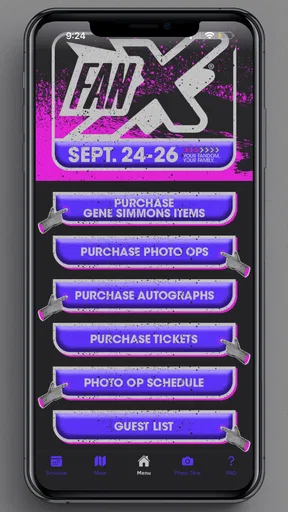
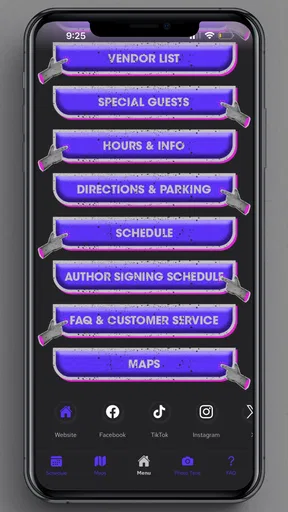
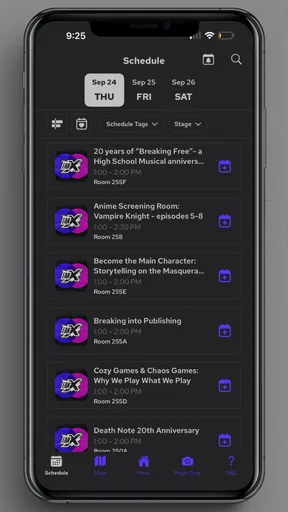
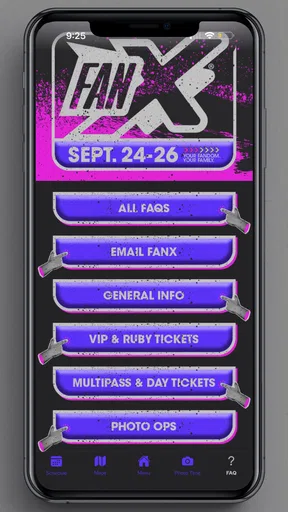
 Analysis by AppCompare
FanX Salt Lake 2025 is the kind of event companion I would install before heading to the convention rather than after arriving. Developed by Dan Farr Productions, LLC., this free events app is designed around the practical side of attending FanX: keeping the convention information close at hand, checking what is happening, and reducing the amount of paper, searching, and last-minute guesswork involved in a busy venue. I found its value less in entertainment on its own and more in how it can support a full convention day.
That distinction matters. This is not a comic-reading app, a social network, or a general events directory. It is the official mobile companion for FanX Salt Lake 2025, with a focused purpose. If you are planning to attend and want one place to begin organizing your visit, it makes sense. If you are simply looking for broad local event discovery, a calendar app or search engine will probably serve you better.
The app is free and rated for Everyone, which makes it easy to recommend as a low-risk preparation tool for families, casual visitors, collectors, cosplayers, and longtime convention attendees alike. Its current version is 9.0.1, and it runs on devices using OS 9 or later. The store listing shows a 3.4 average from around a hundred ratings, with over ten thousand installs, so I would approach it as a useful event utility rather than a universally polished app that replaces every other planning method.
Building a reliable FanX day around the app
I’d make the app part of a simple plan rather than the whole plan: decide which event details you’ll check there, and keep essentials such as your meeting point and travel notes somewhere you can reach independently. That small division can save time when a busy convention day changes course. Next, I’d focus on keeping the app and phone ready before heading out.
Start before you enter the convention
My preferred workflow begins at home, when I still have time to think. I would open the app, look through the available event information, and decide what matters most for the day. That sounds simple, but conventions become tiring quickly when every decision is made while walking, waiting, or trying to hear a friend in a crowded area. The app is most useful when it helps turn a vague wish list into a small number of priorities.
For example, I would separate the day into three layers: the things I absolutely want to attend, the activities I would enjoy if the timing works, and the open gaps that can be used for browsing, food, photos, or rest. This prevents the common mistake of treating every listing as equally important. A convention companion can show you what is available, but it cannot decide which missed opportunity will bother you most. That choice is still yours, and making it before the doors open is one of the best habits for using this type of app.
I also recommend checking the app while your phone is fully charged and while you have a stable connection. Even when an event app is straightforward, relying on a phone in a crowded building creates practical friction. I would take screenshots of the most important information or write down the key times in my normal calendar as a backup. That is not a criticism unique to FanX; it is a sensible habit whenever a whole day depends on quick access to changing event information.
Worth Reading Before You Choose

EA SPORTS FC Mobile 26 Is a Bigger Football Game, but It Takes Time

Flipboard Shows What News Apps Must Do Beyond the Feed

Switching to Android Auto Means Rethinking Your Driving Routine

Google Calendar Makes a Crowded Week Easier to Manage

Ludo King Makes the Most of the Minutes Between Plans

Baby Panda World Brings Quick Play to Modern Phones, but Its Game Library Feels Busy
Use it as a decision tool, not a complete travel plan
The app can help with the convention itself, but I would not make it the only place where I keep travel details. My route to the venue, parking notes, hotel address, meeting point, food plan, and emergency contact information belong in tools I already trust. This separation makes the FanX app easier to use because it remains focused on the event rather than becoming an overloaded notebook.
A realistic example would be a parent attending with two children. Before leaving, I would use the app to identify the parts of the day the family cares about most, then place the venue address, parking information, and a family meeting point somewhere separate. During the event, the app can support the schedule while the backup notes handle the details that do not belong to the convention program. If one child wants to browse merchandise while another wants to attend a different activity, having a prearranged meeting location is more valuable than repeatedly sending messages through a crowded hall.
For a solo visitor, the workflow is different. I would use the app to create a loose route through the day, leaving deliberate empty space rather than filling every hour. Solo attendees can change direction easily, but that freedom can also lead to wasted time. A short list of priorities makes it easier to enjoy an unexpected panel, creator interaction, or shopping opportunity without losing the activities that brought you there.
What I would check in the settings and device setup
I would begin by checking the app’s notification behavior and deciding whether alerts are helpful or distracting. Event reminders can be useful when the day is crowded, but too many interruptions can make the phone harder to manage. I prefer keeping alerts for information that affects a real decision and turning off anything that merely encourages repeated checking. The exact controls available can depend on the device and app build, so I would review what FanX presents rather than assuming every event app offers the same notification system.
Next, I would check display brightness, text size, battery use, and whether the phone is comfortable to read outdoors and indoors. Convention halls often involve quick glances rather than long reading sessions. A readable screen and a familiar navigation gesture matter more than a visually impressive layout. I would also keep the phone’s operating system updated enough to meet the app’s minimum requirement, which is OS 9 or later, and install the latest available app version before the event rather than waiting until arrival.
One useful preparation trick is to place the app where it can be reached with one hand. I would move it to the first screen or a dedicated travel folder, depending on how often I expect to open it. This sounds minor, but it reduces the temptation to unlock the phone, search through several pages, and miss a time-sensitive decision. I would also carry a small power bank if I planned to spend most of the day taking photos, messaging, navigating, and checking event information.
The strongest setup is not the most complicated one; it is the one that keeps essential information reachable when the venue is noisy, crowded, and tiring. That is why I would pair FanX Salt Lake 2025 with the phone’s normal calendar and notes rather than asking one app to do everything.
Faster patterns for moving through a busy schedule
Experienced convention visitors usually do not browse the entire program from scratch every time they need to make a decision. They create repeatable habits. With this app, I would use a three-pass method. The first pass is a quick scan before the event, looking only for major priorities. The second happens shortly before the day begins, when I confirm the plan against the latest information visible in the app. The third is a brief check during the event whenever I reach a natural pause.
This avoids two opposite problems. Checking only once can leave you working from an outdated mental plan, while checking constantly can make the day feel like an administrative task. A short review at breakfast, another before a major transition, and occasional checks during breaks are more realistic than staring at the schedule every few minutes.
I would also plan around transitions instead of only around start times. If two activities are close together, the time between them may still be needed for walking, finding the correct room, using the restroom, or dealing with a line. An app can show event information, but the visitor must account for the physical size and pace of the venue. My rule would be to treat a schedule as a set of targets, not a promise that every item can be reached perfectly.
Another practical pattern is to create a “drop list” before the day starts. These are activities I am interested in but willing to skip if the route becomes inconvenient. This keeps the main plan flexible without forcing me to make every decision from zero. It is especially helpful for groups, because someone can suggest a change without making the whole schedule collapse.
For people attending with friends, I would agree on a communication routine before entering. The app can help each person understand the event plan, but it does not remove the need for a meeting point or a clear time to regroup. If phones lose signal, batteries run low, or a group separates in a crowded hall, a simple offline plan is more dependable than repeatedly refreshing a screen.
Where the app is genuinely useful
The biggest strength here is focus. Because FanX Salt Lake 2025 is an official companion rather than a general-purpose events platform, I would expect it to be most relevant to people whose day is centered on this convention. That focus makes it easier to begin with event-specific information instead of sorting through unrelated listings, broad web results, or social posts that mix announcements with personal opinions.
It is also useful for visitors who do not attend conventions often. A first-time attendee may not know which information deserves attention or how to structure the day. Having a dedicated reference point can make the event feel less intimidating. I would still encourage newcomers to keep their first plan modest: choose a few priorities, leave time to explore, and avoid assuming that a packed schedule equals a successful visit.
Families may appreciate the free price and Everyone content rating, particularly when several people need access to the same event information. Cosplayers can use the app as one part of a timing plan, especially when costume changes, photography, and rest need to fit around scheduled activities. Collectors and shoppers may prefer using it to identify the shape of the day, then keeping purchase notes and spending limits elsewhere.
For media creators, the app can help with planning when to move between activities, but I would not treat it as a replacement for a production workflow. Camera settings, storage space, charging, consent, and file organization still need separate attention. The same is true for accessibility planning: the app may help identify event information, while personal mobility, seating, sensory needs, and support arrangements require more deliberate preparation.
Important limits and when another option is better
The rating of 3.4 suggests that the experience is mixed for some users, and I think that is a fair reason to keep expectations practical. Official event apps can be valuable while still feeling less refined than the calendar, notes, and navigation tools people use every day. If you want a highly customized agenda, advanced reminders, cross-device synchronization, or a long-term archive of events, your normal productivity tools may be better suited.
I would also skip relying on this app alone if I were attending mainly for spontaneous exploration. Someone who prefers wandering through a convention without planning may find a dedicated schedule app more useful as a reference than as a daily command center. Conversely, visitors with a tightly timed list of must-see activities should keep a backup because no mobile event tool can solve delays, room capacity, queues, or the simple reality that one person cannot be in two places at once.
Another trade-off is that an official companion naturally has a narrow lifespan of usefulness. Its value is tied to the FanX event it supports, unlike a general calendar or notes app that remains useful after the convention. That does not make it a poor download; it simply changes the decision. I would install it when preparing for FanX, use it actively during the visit, and avoid treating it as a permanent everyday app.
Users on older devices should pay attention to compatibility before making it part of their plan. The minimum requirement is OS 9 or later, so anyone using an older system should check the device before the event rather than discovering the limitation at the entrance. People who dislike notifications should review them early, and anyone with limited storage or battery capacity should prepare the phone as carefully as they prepare their badge, wallet, and transportation.
Small habits that make a noticeable difference
My first advanced habit would be to convert the app’s information into decisions, not just bookmarks. For every important item, I would ask: Is this a must-see, a nice-to-see, or a backup option? That classification is more useful than collecting a long list that becomes impossible to follow. It also makes last-minute changes less stressful because I already know what can be sacrificed.
My second habit would be to review the plan at natural physical checkpoints. I would check the app after entering, after a major activity, and during a planned rest. This creates a rhythm that matches the movement of the day. It also helps preserve battery and attention, two resources that disappear quickly at a large convention.
My third habit would be to keep a compact offline record of the day’s essentials. I would capture the few details I cannot afford to lose, then use the app for broader reference and updates. This is not about assuming that the app will fail; it is about recognizing that phones can run out of power, networks can become congested, and busy venues are not ideal places for troubleshooting.
A fourth useful trade-off is choosing flexibility over completeness. If I have to decide between reaching a distant activity and spending time with friends who are enjoying the current area, I would not let the schedule make that decision for me. The app should support the experience, not become the experience. Its best role is to reduce avoidable uncertainty so that I can spend more attention on the people and interests that brought me to FanX.
My verdict for different kinds of attendees
I would recommend FanX Salt Lake 2025 to anyone attending the convention who wants an official starting point for organizing the day. It is particularly suitable for first-time visitors, families coordinating several interests, and returning attendees who prefer checking event information from a dedicated app instead of relying entirely on browser searches. The fact that it is free removes the main barrier to trying it, and the Everyone rating makes it broadly approachable.
I would be more cautious for people expecting a sophisticated personal planner. If your ideal experience involves detailed custom scheduling, extensive reminders, permanent records, or seamless integration with every other part of your life, use your preferred calendar and notes tools alongside it. I would also avoid making it the only backup for transportation, meeting arrangements, or essential personal information.
Overall, I see this as a practical companion rather than a must-have app for every phone. Its success depends on how you use it. Installed shortly before attending, configured to avoid unnecessary distraction, and paired with a simple backup plan, it can make FanX easier to navigate and less mentally demanding. Installed without preparation and treated as a complete replacement for planning, it is less convincing.
For me, the deciding question is simple: are you going to FanX Salt Lake 2025 and do you want event information close by? If the answer is yes, I would download it and build a modest plan around it. My recommendation is to use it as the official reference layer, while keeping your personal schedule, travel details, and backup notes under your own control. That balance gives the app room to do what it is best at without expecting it to solve every part of a convention day.
Pros
- Official event updates
- schedules
- and announcements in one place.
- Useful for tracking panels
- guests
- signings
- and special activities.
- Helps attendees plan visits around the large convention schedule.
- Provides timely information about venue changes or event notices.
- Convenient companion for fans attending FanX Salt Lake 2025.
Cons
- Most useful features may depend on current event data being available.
- Large schedules can feel overwhelming for first-time attendees.
- Some information may become outdated after the convention ends.
- Requires internet access for the latest updates and event details.
- Limited value for users who are not attending FanX Salt Lake 2025.
FAQs for FanX Salt Lake 2025
What is the FanX Salt Lake 2025 app used for?
The FanX Salt Lake 2025 app is designed to help attendees plan and enjoy the convention in Salt Lake City. It typically provides access to the event schedule, guest information, panel details, exhibitor listings, maps, announcements, and other practical updates. It can be especially useful for organizing your day when several panels, autograph sessions, and activities overlap.
Can I use the app to view the FanX Salt Lake 2025 schedule and plan panels?
Yes, one of the most useful features is the convention schedule. You can browse panels, celebrity appearances, workshops, screenings, and other activities, then decide which events fit your personal itinerary. Because schedules and room assignments may change, it is a good idea to check the app regularly for updates rather than relying only on an earlier printed schedule or social media post.
Does the FanX Salt Lake 2025 app include guest, exhibitor, and artist information?
The app is intended to make convention information easier to explore by bringing guest appearances, exhibitors, artists, creators, and featured activities together in one place. Availability can vary depending on the event release and app version, but users should generally expect useful details about who is attending and where to find vendors, artists, merchandise, and special attractions throughout the convention.
Do I need an internet connection to use the FanX Salt Lake 2025 app?
An internet connection may be needed initially to download the app, load current schedules, receive announcements, and retrieve updated event information. Some content may remain available after it has loaded, but offline access should not be assumed for every feature. Before arriving, open the app while connected to Wi-Fi or mobile data and review the information you expect to need.
Is the FanX Salt Lake 2025 app free, and does it replace my event ticket?
The official event app is generally intended to be available at no additional cost, although normal mobile data charges may apply. Installing it does not usually purchase admission, reserve a panel seat, or replace your convention ticket, badge, or identification requirements. Check the official FanX instructions for ticket rules, registration details, and any activities that require separate payment or reservations.


